Concepts
Purpose
PacketFence (PF) is a wrapper as well as provides extra features for FreeRadius. It provides a UI that is used to manage FreeRadius modules but does not map 1 to 1 with FreeRadius config settings. It is abstracted a layer above to make management easier. Much of the flow of FreeRadius is managed by PacketFence and handled automatically so it can be tricky to understand how settings link together.
Flow of a Request
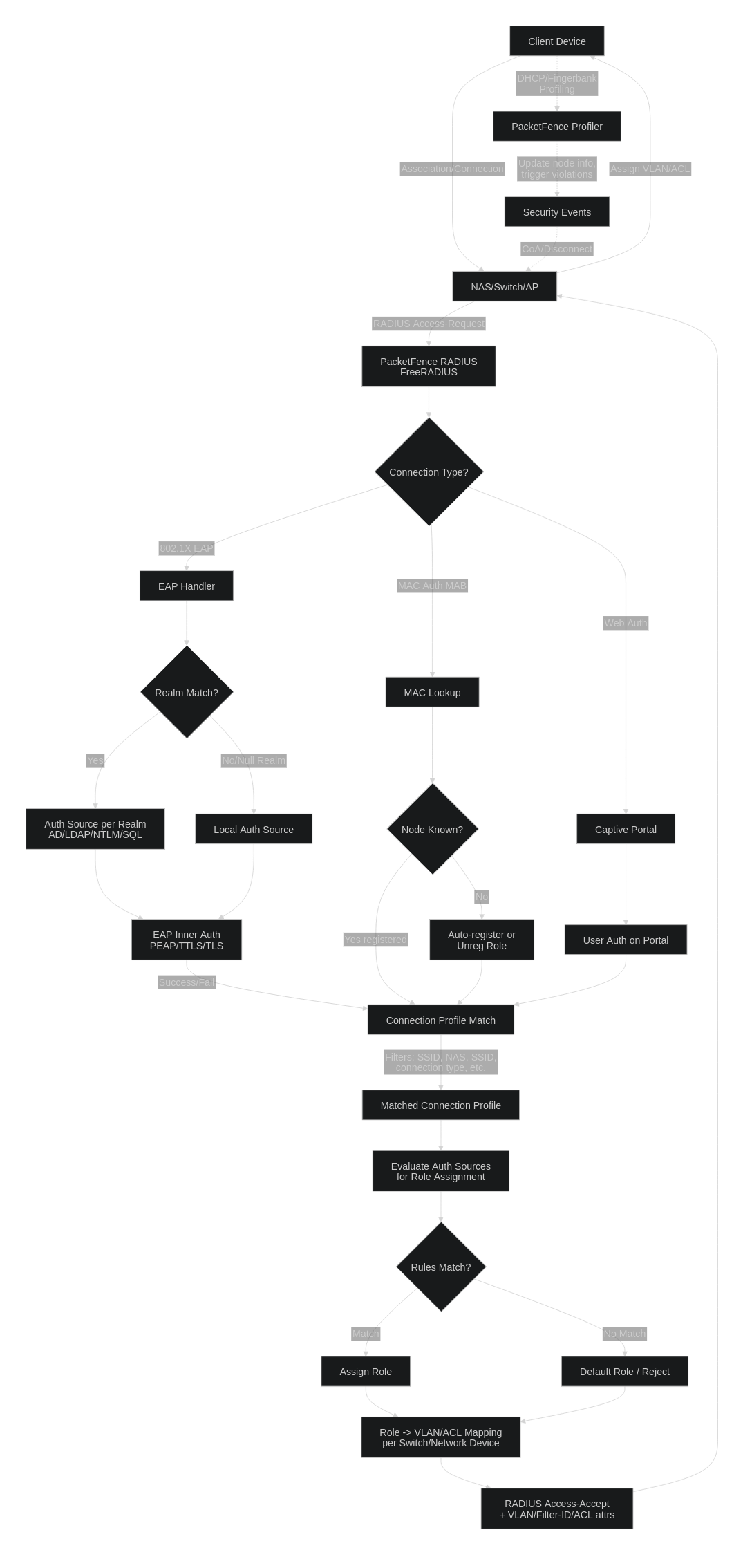
PF takes incoming RADIUS requests from a NAS (switch, AP, or controller) and processes them through a defined chain before returning an Access-Accept/Reject with VLAN or ACL attributes. The primarystages conceptbelow run in order for every authentication attempt.
1. RADIUS Request Arrival
The NAS sends an Access-Request to PacketFence's FreeRADIUS instance when a client associates or plugs in. The request type determines the auth path:
2. Realm Resolution (EAP only)
For EAP requests, PF parses the username (e.g. user@realm or DOMAIN\user) and matches it against the Realms configuration. The realm determines which Authentication Source handles the outer/inner EAP exchange (AD via NTLM, LDAP with PAP, SQL, etc.). A null or unmatched realm falls through to the default/local source.
3. Authentication
4. Connection Profile Matching
PF evaluates Connection Profiles top-down using filters (SSID, NAS IP, connection type, VLAN, realm, etc.). The first profile whose filters match the request wins. The connection profile dictates which auth sources are consulted for role assignment (this is separate from the EAP auth source used in step 2/3).
5. Role Assignment
The matched profile's auth sources are evaluated in order. Each source contains rules that compare attributes (group membership, username, MAC, time of PacketFenceday, (PF)etc.) and assign a role on match. If no rule matches, the default role for the profile is thatused, itor providesthe request is rejected.
6. Role → Network Enforcement Mapping
The assigned role is translated into concrete RADIUS reply attributes per the Switch/Network Device configuration. Each switch entry maps roles to:
Tunnel-Private-Group-ID)
Filter-IDs or downloadable ACLs
Vendor-specific attributes (Unifi, Cisco, Aruba, etc.)
7. Access-Accept Returned
PF sends the Access-Accept with the role's attributes back to the NAS, which places the client on the correct VLAN and applies any ACLs.
8. Profiling & Security Events (Parallel)
After the session is up, PF passively collects DHCP fingerprints, user-agent strings, and other telemetry, sending them to Fingerbank for device profiling. Profile changes or triggered Security Events (violations) can fire a RADIUS CoA / Disconnect to the NAS, forcing reauthentication and a new role assignment mid-session — this is how PF quarantines or reclassifies devices without admin intervention.