Concepts
Overview of this Document
This document covers basic concepts of Radius, 802.1x and PacketFence.
RADIUS is very complicated and this document attempts to help break down the concepts for better understanding.
This document explains:
- The flow of a RADIUS request from start to finish
- How PacketFence puts its twist on requests
- 802.1x concepts
PacketFence Purpose
PacketFence (PF) is a wrapper as well as provides extra features for FreeRadius. It provides a UI that is used to manage FreeRadius modules but does not map 1 to 1 with FreeRadius config settings. It is abstracted a layer above to make management easier. Much of the flow of FreeRadius is managed by PacketFence and handled automatically so it can be tricky to understand how settings link together.
The FreeRadius documentation was used for referencing and verifying this information. Its strictly documentation for FreeRadius so it doesn't exactly apply to PF especially for configuration. However, as PF uses FreeRadius under the hood it is very useful for understanding some of the concepts of RADIUS. The PF documentation is useful for configuring examples but I found it lacking in explanations.
Network RADIUS Requests
The flow starts when a device tries to connect to the network either by a switch port or connecting to an Access Point SSID. Both the switch and AP are refered to as a "NAS" (Network Access Server). The device attempting to connect is referred to as the Node. When a node connects to a NAS initially the NAS will essentially proxy requests to the RADIUS server to verify AAA (Authentication, Authorization, Accounting).
802.1X Networks
When a port is set to 802.1X or it is an Enterprise SSID, EAP is REQUIRED before the NAS allows the node on the network at all.
The node sends EAPOL (EAP over LAN) frames to the switch at link-up. The switch strips the EAP payload, wraps it in a RADIUS Access-Request, and relays it to the RADIUS server. This is the full inner/outer tunnel flow described below. The node itself must have an 802.1X supplicant which most every modern network PC or phone has.
The issue with this is this requires extra configuration on the Nodes end meaning that unless the device is a managed device where configuration can be pushed out by policy, this will be a lot of extra work setting up each device as this will be too complex for most customers.
Used in:
- High security networks
- 802.1x switch port profiles
- WPA2/WPA3-Enterprise wireless networks
- All devices are managed for policy deployement
- Customer is able to configure the connection themselves (unlikely
MAC Authentication Bypass No EAP
Some ports are set to MAB for devices that cant run a supplicant or for networks where configuring the node is too difficult. The switch detects a connection, grabs the nodes MAC address, and sends a plain RADIUS Access-Request with the MAC used as both username and password. No EAP, no TLS tunnel, no inner method. The server checks the MAC against a whitelist and either accepts or rejects it. Common for printers, IP phones, cameras, IoT or open networks where you the node is put onto an isolation VLAN to further authorize on a web portal or other method.
EAP Process
Outer Tunnel (EAP)
The outer tunnel is the encrypted wrapper. When a node connects, the NAS sends an Access-Request to the RADIUS server. The server replies with an Access-Challenge asking for an EAP identity. This kicks off an EAP handshake carried through the NAS, which is just passing packets back and forth between the node and server without inspecting them.
The outer tunnel establishes a TLS session between the node and the RADIUS server. The NAS is blind to this traffic it just relays EAP frames. Common outer methods:
PEAP Protected EAP wraps inner auth inside a TLS tunnel
EAP-TTLS same concept, tunneled TLS
EAP-TLS mutual certificate auth, no inner tunnel needed
Once the TLS tunnel is up, the outer phase is done.
Inner Tunnel
Inside the encrypted TLS session, the actual authentication happens. The outer tunnel already established trust (the server proved its identity with a certificate), so the inner method can send credentials in cleartext inside that protected channel.
Common inner methods inside PEAP/TTLS:
MSCHAPv2 username + NT hash challenge-response. Used by Windows devices natively
PAP plaintext username/password inside the tunnel. Works with anything
EAP-GTC generic token card, one-time passwords
The RADIUS server receives the inner credentials, checks them against its user store LDAP, local DB, Active Directory, and sends back an Access-Accept or Access-Reject through the NAS to the node.
Full Flow Example PEAP-MSCHAPv2
Node connects to NAS switch port or SSID
NAS sends RADIUS Access-Request to server
Server sends Access-Challenge start TLS
NAS relays challenge to node
Node and server negotiate TLS certificate validation
TLS tunnel established NAS is still just passing bytes
Inside the tunnel node sends username
Server challenges node for password hash
Node responds with MSCHAPv2 response
Server verifies against AD/LDAP
If valid server sends Access-Accept with attributes VLAN ID, QoS policy, session timeout
NAS applies those attributes to the port/association
Node gets network access
Accounting
Once authenticated, the NAS sends Accounting-Start to the RADIUS server tracking when the session began, which NAS, which port. When the node disconnects the NAS sends Accounting-Stop with session duration and bytes transferred. The server logs these for billing, auditing, or just knowing whos on the network.
NAS Attributes
The Access-Accept packet includes vendor-specific attributes the NAS interprets:
Filter-ID ACL name to apply
Tunnel-Private-Group-ID VLAN assignment
Session-Timeout forces reauthentication
Idle-Timeout disconnects idle sessions
The NAS is essentially a policy enforcement point. The RADIUS server is the decision engine. The NAS never decides auth it only enforces what the server tells it to do.
Flow of a Request Inside of Packetfence
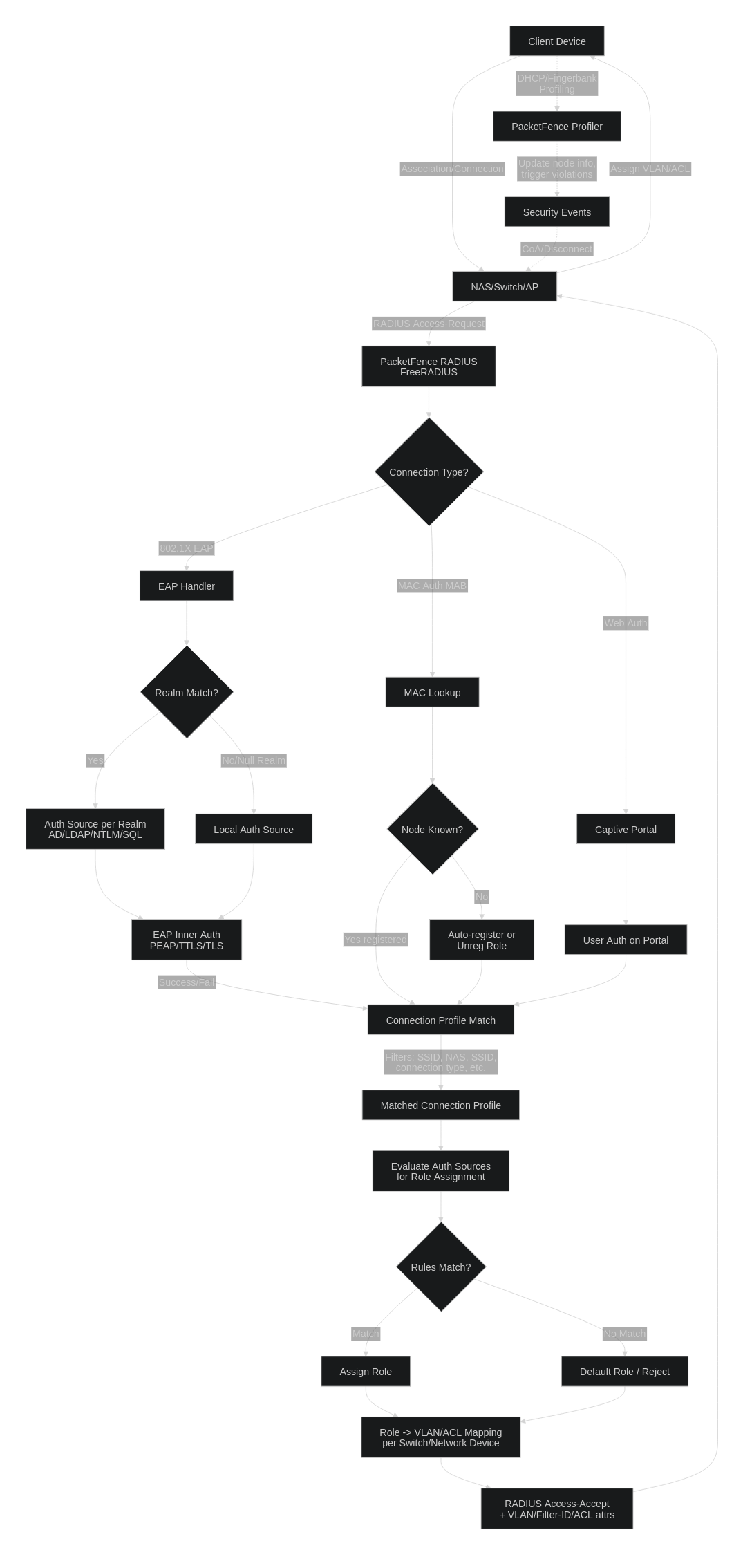
PF takes incoming RADIUS requests from a NAS (switch, AP, or controller) and processes them through a defined chain before returning an Access-Accept/Reject with VLAN or ACL attributes. The stages below run in order for every authentication attempt.
Flow Chart at the bottom of the page
1. RADIUS Request Arrival
The NAS sends an Access-Request to PacketFence's FreeRADIUS instance when a client associates or plugs in. The request type determines the auth path:
- 802.1X (EAP) — used by WPA2/WPA3-Enterprise SSIDs and wired dot1x.
- MAC Authentication (MAB) — used for open SSIDs or non-802.1X-capable devices (printers, IoT).
- Web Auth — client is redirected to the captive portal for credential entry.
2. Realm Resolution (EAP only)
For EAP requests, PF parses the username (e.g. user@realm or DOMAIN\user) and matches it against the Realms configuration. The realm determines which Authentication Source handles the outer/inner EAP exchange (AD via NTLM, LDAP with PAP, SQL, etc.). A null or unmatched realm falls through to the default/local source.
3. Authentication
- EAP: Inner method (PEAP-MSCHAPv2, EAP-TTLS, EAP-TLS) is negotiated and validated against the realm's auth source.
- MAB: The client MAC is looked up in the PF node database. Known/registered nodes proceed; unknown nodes are auto-registered or assigned the unregistered role depending on the connection profile.
- Portal: User submits credentials on the captive portal, which are validated against the portal's configured auth sources.
4. Connection Profile Matching
PF evaluates Connection Profiles top-down using filters (SSID, NAS IP, connection type, VLAN, realm, etc.). The first profile whose filters match the request wins. The connection profile dictates which auth sources are consulted for role assignment (this is separate from the EAP auth source used in step 2/3).
5. Role Assignment
The matched profile's auth sources are evaluated in order. Each source contains rules that compare attributes (group membership, username, MAC, time of day, etc.) and assign a role on match. If no rule matches, the default role for the profile is used, or the request is rejected.
6. Role → Network Enforcement Mapping
The assigned role is translated into concrete RADIUS reply attributes per the Switch/Network Device configuration. Each switch entry maps roles to:
- VLAN IDs (
Tunnel-Private-Group-ID) - Filter-IDs or downloadable ACLs
- Vendor-specific attributes (Unifi, Cisco, Aruba, etc.)
7. Access-Accept Returned
PF sends the Access-Accept with the role's attributes back to the NAS, which places the client on the correct VLAN and applies any ACLs.
8. Profiling & Security Events (Parallel)
After the session is up, PF passively collects DHCP fingerprints, user-agent strings, and other telemetry, sending them to Fingerbank for device profiling. Profile changes or triggered Security Events (violations) can fire a RADIUS CoA / Disconnect to the NAS, forcing reauthentication and a new role assignment mid-session — this is how PF quarantines or reclassifies devices without admin intervention.
Flow Chart: